Friday, 10 January 2025
Viral TikTok Video
Script:
Environment: Close-up shots of the content creator sketching ideas in a notebook, with some shots of a smartphone screen displaying TikTok videos for inspiration.
Environment: Show a split-screen of the content creator demonstrating different filming techniques, such as transitions, use of filters, and creative camera angles.
Environment: Screen recording of the content creator editing a video using a popular editing app, with voice-over explaining the editing process.
Environment: Show the content creator posting the video on TikTok, engaging with comments, and responding to followers.
Environment: Close-up shot of the content creator giving a thumbs up to the camera, with a call-to-action for viewers to start creating their own viral TikTok videos.

Wednesday, 6 October 2021
کسی کے فون کو چھونے کے بغیر اسے کیسے ہیک کریں؟

آج ٹکنالوجی کی آمد کے ساتھ ، ہماری بیشتر معلومات آن لائن ہیں ، اور چاہے کوئی کتنا ہی کہے ، ہمارا ڈیٹا غیر محفوظ ہے۔ آپ نے ہیکنگ ، اخلاقی ہیکنگ اور جاسوسی جیسی اصطلاحات کے بارے میں سنا اور جانا ہوگا۔ برسوں پہلے ، لوگوں نے سوچا تھا کہ صرف ایک انتہائی ذہین انسان یا ایک ہائی پروفائل ہیکر اس طرح کے کام کرسکتا ہے۔ آج ، آپ گوگل کو "کسی فون کو ہیک کرنے کا طریقہ" دے سکتے ہیں تاکہ کسی کے فون کو اس کے نمبر کے ساتھ یا اس کے بغیر ہیک کرنے کے بارے میں معلومات حاصل کی جا سکے۔ لیکن آج کل ہیکنگ اور جاسوسی کرنا آسان ہو گیا ہے۔ بعض اوقات ، آپ کو بھی ایسا کرنے کے لیے ہدف والے شخص کے فون کی ضرورت نہیں ہوتی ہے۔ ایک کلارک سکول کا مطالعہ جو کہ مشیل کوکیئر نے کیا ہے ، بتاتا ہے کہ ہیکر ہر 39 سیکنڈ میں کسی کی رازداری پر حملہ کرتا ہے۔ اوسطا it ، یہ دن میں 2،244 بار کے برابر ہے۔ ہر کوئی ہیکنگ کے عمل سے واقف نہیں ہے ، اور یہ بیشتر ممالک میں غیر قانونی ہے۔ پیغامات پڑھنا ، مقام کا سراغ لگانا ، یا کسی کی ٹیلی فونک گفتگو ریکارڈ کرنا سب اس کا حصہ ہیں۔
دوسروں کی رضامندی کے بغیر یہ سرگرمیاں کرنا اور ہدف والے شخص کے استحصال کے لیے ڈیٹا کا استعمال ہیکرز کو جیل میں ڈال سکتا ہے۔ یہ ہیکنگ گائیڈ کسی کے فون کو ہیک کرنے کے طریقے پر کچھ روشنی ڈالے گا۔ ہمارا مقصد اس رویے کی حوصلہ افزائی کرنا نہیں بلکہ لوگوں کو اس طرح کی سرگرمیوں سے آگاہ کرنا ہے۔
کسی کے فون کو دور سے کیسے ہیک کریں؟
ایک یا دو دہائیاں پہلے کسی کے فون کو دور سے ہیک کرنا ناممکن لگتا تھا۔ لیکن کچھ تکنیکی ترقی کے ساتھ ، یہ اب ممکن ہو گیا ہے۔ کوئی بھی اپنے گھر کے آرام سے بیٹھ کر ایسا کر سکتا ہے۔ اس ڈیجیٹل دور میں ، ہماری ذاتی معلومات اور ڈیٹا اب نجی نہیں ہیں۔ جاسوسی ایپس ہیں جو لوگوں کو اجازت دیتی ہیں کہ وہ کسی کے فون کو دور سے ہیک کریں اور پس منظر میں ان کے علم کے بغیر کام کریں۔ کیا آپ نے کبھی سوچا ہے کہ کسی کے فون کو دور سے کیسے ہیک کیا جائے؟ عام طور پر ، لوگ بامعاوضہ جاسوسی ایپس استعمال کرتے ہیں۔ دلچسپی رکھنے والا شخص فون یا لیپ ٹاپ پر ان ایپس کی آفیشل ویب سائٹس پر جا کر اس عمل کو شروع کر سکتا ہے اور سبسکرپشن کا انتخاب کر سکتا ہے۔ کچھ طریقوں کو ہدف والے شخص کے آلے تک جسمانی رسائی کی ضرورت ہوتی ہے ، یہاں تک کہ چند منٹ کے لیے بھی۔ ہیکر آلہ کا استعمال 2 فیکٹر توثیقی نظام یا دیگر سیکورٹی پروٹوکول کو غیر فعال کرنے کے لیے کرتا ہے تاکہ ٹارگٹ شخص کے سوشل میڈیا ہینڈل میں داخل ہو سکے۔ ایک بار جب ہیکرز پاس ورڈ جان لیتے ہیں ، تو وہ متاثرہ شخص کے علم کے بغیر پیغامات اور آن لائن سرگرمیوں کو چیک کر سکتے ہیں۔ کچھ لوگ اپنے موبائل فون پر پاس ورڈ رکھتے ہیں۔ اس کے برعکس ، دوسرے انہیں براؤزر میں محفوظ کرتے ہیں تاکہ انہیں دوبارہ لاگ ان آئی ڈی اور پاس ورڈ داخل نہ کرنا پڑے۔ یہ ایک خامی بھی ہے جسے ہیکرز کسی دوسرے شخص کی شناخت اور پاس ورڈ حاصل کرنے کے لیے استعمال کر سکتے ہیں۔
Tuesday, 5 October 2021
آپ کو کسی کے واٹس ایپ کو ہیک کرنے کی ضرورت کیوں ہے؟
کسی کے فون کو ان کے جاننے کے بغیر ہیک کرنا ناممکن لگتا ہے ، لیکن ایسا نہیں ہے ، اور یہی کسی کے واٹس ایپ کو ہیک کرنے پر لاگو ہوتا ہے۔ لوگ اسے کئی وجوہات کی بنا پر کرتے ہیں۔ کچھ اپنی ایمانداری کے بارے میں جاننے کے لیے کسی دوسرے شخص کی پرائیویسی کو توڑ دیتے ہیں ، جبکہ دوسرے اسے تشویش سے یا اس شخص کی ذہنی صحت کی نگرانی کے لیے کرتے ہیں۔ اکثر ، والدین یہ جاننے کی کوشش کرتے ہیں کہ ان کا بچہ چھپا ہوا ہے۔ اگر نوعمروں کو سوشل میڈیا کے منفی اثرات کا سامنا ہے تو والدین ان کے ساتھ سوشل میڈیا سے دور رہنے کے فوائد پر بات کر سکتے ہیں۔ کوئی شک نہیں ، سوشل میڈیا ڈیٹوکس ہماری زندگیوں کو بدل رہا ہے۔
یہ چار وجوہات ہیں کہ کوئی بھی جاننا چاہتا ہے کہ واٹس ایپ کو کیسے ہیک کیا جائے۔
محبت کرنے والوں کی جاسوسی۔
کسی وقت ، ایک لڑکی یہ جاننے کے لیے بے چین ہو سکتی ہے کہ میں اپنے بوائے فرینڈ کے ٹیکسٹ پیغامات کو اس کے فون کو چھوئے بغیر کیسے پڑھ سکتا ہوں۔ اسی طرح ، ایک لڑکا جاننا چاہتا ہے کہ میری گرل فرینڈ کا فون کیسے ہیک کیا جائے۔ شادی شدہ جوڑے یہ بھی سوال کر رہے ہیں کہ میرے شوہر کے سیل فون کو چھونے کے بغیر اس کی جاسوسی کیسے کی جائے یا میرے فون سے میری بیوی کے ٹیکسٹ پیغامات کو کیسے پڑھا جائے۔ شک رشتوں کو ختم کرتا ہے ، لیکن اگر آپ گرل فرینڈ کو دھوکہ دیتے ہوئے یا بوائے فرینڈ کو وقت پر دھوکہ دیتے ہوئے پکڑ لیتے ہیں تو یہ یقینی طور پر آپ کی زندگی میں آگے بڑھنے میں مددگار ثابت ہوگا۔ تعلیم یافتہ رہیں وہ آپ کو دھوکہ دینے کے لیے دیگر ایپلی کیشنز جیسے واٹس ایپ استعمال کر سکتے ہیں۔
بچوں کی حفاظت۔
نوجوان بالغ اس پلیٹ فارم پر کافی متحرک ہیں ، اور بعض اوقات ، وہ اسے دوسرے سوشل میڈیا پلیٹ فارم پر کسی سے بھی ملنے کے لیے بات کرنے کے لیے استعمال کرتے ہیں۔ سوشل میڈیا کے فوائد سے کوئی انکار نہیں کر سکتا ، لیکن اس کے ہماری زندگی کے نقصانات بھی ہیں۔ والدین نہیں جانتے کہ وہ شخص کون ہے اور وہ بچوں کی بھیجی گئی معلومات یا تصاویر کا غلط استعمال کیسے کرسکتا ہے۔ والدین کو ان حالات سے آگاہ ہونا چاہیے اور ایسی کوئی علامت تلاش کرنا چاہیے جو سائبر دھونس کا باعث بن سکے۔
ملازمین کی سرگرمیوں کی نگرانی
آپ یقین کریں یا نہ کریں ، کام کی جگہ پر سوشل میڈیا ملازم کی پیداوری کو متاثر کرتا ہے۔ اس پر غور کرنا انتظامیہ کی ذمہ داری ہے۔ واٹس ایپ جیسے سوشل میڈیا پلیٹ فارم نے کسی بھی وقت کسی سے بھی رابطہ کرنا ممکن بنا دیا ہے۔ کچھ ملازمین ان کا استعمال اپنے دوستوں یا خاندان تک پہنچنے کے لیے کرتے ہیں یا کام کی جگہ پر کمپنیوں کے رازوں کا غلط استعمال کرتے ہیں۔ کچھ آجر یہ جاننے کے لیے واٹس ایپ اکاؤنٹس ہیک کرتے ہیں کہ آیا ان کے ملازم کام کر رہے ہیں یا دفتر میں وقت ضائع کر رہے ہیں۔
حذف شدہ پیغامات کو بازیافت کریں۔
واٹس ایپ استعمال کرنے والے اپنے اکاؤنٹ ہیک کر سکتے ہیں اگر وہ اپنا فون کھو بیٹھے یا اپنے آلے کے پاس ورڈ یا پن بھول جائیں۔ یہ بھی مفید ہے اگر صارف نے غلطی سے اپنے واٹس ایپ پیغامات کو حذف کر دیا ہو اور اصل ریکارڈ بازیافت کرنا چاہتا ہو۔ اینڈرائیڈ فونز کے لیے حذف شدہ واٹس ایپ پیغامات کی بازیابی کے لیے ہماری گائیڈ یہ ہے۔
پاس ورڈ کے بغیر اسنیپ چیٹ اکاؤنٹ کو کیسے ہیک کریں؟
سنیپ چیٹ ایک عالمی انسٹنٹ میسجنگ پلیٹ فارم ہے جو صارفین کو جلدی سے اپنے پسندیدہ لمحات دوستوں اور خاندان کے ساتھ شیئر کرنے کی اجازت دیتا ہے۔ یہ ایپلیکیشن مقبولیت حاصل کر رہی ہے اور دنیا بھر کے صارفین تک رسائی حاصل کر رہی ہے ۔
لمحات (تصاویر یا ویڈیوز) جو صارفین نے شیئر کیے ہیں وہ صرف چند منٹ کے لیے رہتے ہیں اور رسید کے لیے ہمیشہ کے لیے دستیاب نہیں ہو جاتے۔ لہذا ، صارف اپنے پسندیدہ لمحات کو اپنے خاندان کے ساتھ زیادہ اعتماد کے ساتھ بانٹ سکتا ہے۔ اس طرح سوشل میڈیا کے فوائد سے انکار نہیں کیا جا سکتا۔
اس فیچر نے ہیکرز کے لیے ناپسندیدہ توجہ بھی حاصل کر لی ہے جن کا خیال ہے کہ وہ کچھ بھی ہیک کر سکتے ہیں۔ لیکن کیا واقعی اسنیپ چیٹ ہیک کرنا ممکن ہے؟ اگر ہاں ، تو متاثرہ کے علم کے بغیر اسنیپ چیٹ اکاؤنٹ کو کیسے ہیک کیا جائے۔
بہت سے طریقے ہیں کہ ہیکرز کسی کی رازداری کو توڑنے کی کوشش کرتے ہیں ، اور ہم ان سب پر روشنی ڈالیں گے۔ تو ، کسی کے سنیپ چیٹ میں ہیک کرنے کا طریقہ مزید جاننے کے لیے پڑھیں۔
کیا اسنیپ چیٹ کو ہیک کیا جا سکتا ہے؟
سوشل میڈیا ایپلی کیشنز کی آمد کے ساتھ ، ہم دنیا کے دوسرے سرے پر رہنے والے لوگوں کے قریب ہو گئے ہیں۔ لیکن اس نے ہمیں ہیکرز کے سامنے بھی لایا ہے کہ وہ ہماری پرائیویسی کو ہیک کریں اور اس کا غلط استعمال کریں۔ اسنیپ چیٹ کو ہیک کرنا بھی ان کے لیے کوئی بڑا کام نہیں ہے۔
آپ یہ جان کر حیران ہوں گے کہ نہ صرف ہیکرز بلکہ بعض اوقات دوست ، ساتھی ، محبت کرنے والے ، شریک حیات ، بچے وغیرہ بھی اسنیپ چیٹ اکاؤنٹس ہیک کر لیتے ہیں۔ بعض اوقات وہ اسے تشویش سے کرتے ہیں ، جبکہ دوسری بار ، یہ ایمانداری کی جانچ کے لیے کرتے ہیں۔
لیکن چونکہ یہ ایپ لمحات کو گفتگو سے ہمیشہ کے لیے غائب کر دیتی ہے ، اسنیپ چیٹ کو ہیک کرنا اور متاثرہ شخص جو دوسرے شخص کے ساتھ شیئر کر رہا ہے اسے پڑھنا ناممکن لگتا ہے۔ یہ ایک تشویش کا موضوع ہو سکتا ہے ، خاص طور پر ان والدین کے لیے جو نہیں جانتے کہ بچے کیا کر سکتے ہیں یا انٹرنیٹ پر شیئر کر رہے ہیں۔ لہذا ، حیرت ہے کہ اسنیپ چیٹ اکاؤنٹ کو کیسے ہیک کیا جائے ، یا اسنیپ چیٹ کو ہیک کیا جاسکتا ہے ، یہ کسی کے لئے بھی ممکن ہے۔
میرا واٹس ایپ پروفائل اور اسٹیٹس کس نے دیکھا اسے کیسے جانیں
کیا آپ نے اپنے آپ کو واٹس ایپ اسٹاکرز سے بچایا ہے؟ کیسے پتہ چلے کہ کوئی آپ کا واٹس ایپ چیک کر رہا ہے؟ کیا آپ کو تشویش ہے کہ میرا واٹس ایپ پروفائل اور اسٹیٹس کس نے دیکھا؟ کیا یہ چیک کرنے کا کوئی طریقہ ہے کہ میرا واٹس ایپ پروفائل کس نے دیکھا؟
میرا واٹس ایپ پروفائل کس نے دیکھا اسے ٹریک کرنے کے لیے واٹس ایپ کے پاس کوئی ڈیفالٹ آپشن نہیں ہے۔ کچھ
واٹس ایپ پروفائل دیکھنے والے ایپس مارکیٹ میں دستیاب ہیں اور دعویٰ کر
رہے ہیں کہ وہ چیک کر سکتے ہیں کہ میرے واٹس ایپ پروفائل پر کون آیا ، لیکن
افسوس کی بات یہ ہے کہ ان میں سے کوئی بھی کارآمد نہیں ہے۔
کیا کوئی واٹس ایپ اسٹاکنگ ایپ دستیاب ہے؟ جی
ہاں ، گوگل پلے اسٹور ، آئی او ایس اسٹور ، اور دوسرے تھرڈ پارٹی ایپ
اسٹورز واٹس ایپ کے پروفائل زائرین کو چیک کرنے کے لیے بہت سی ایپس پیش کر
رہے ہیں۔
تمام واٹس ایپ پروفائل دیکھنے والے ایپس جیسے واٹس ایپ جنہوں نے مجھے دیکھا ، میری پروفائل پر کون آئے؟ - واٹس ایپ اینڈروئیڈ کے لیے واٹس ٹریکر ، واٹس ٹریکر وغیرہ جعلی ہیں۔
ہمارے رئیلٹی چیک ٹیسٹ میں ، وہ تمام لوگ جنہوں نے میرے واٹس ایپ پروفائل ایپس کو دیکھا وہ ناکام ہو گئے۔ ان کا دعویٰ جھوٹا ہے۔ یہ ایپس ان لوگوں کو چیک نہیں کر سکتی جو میرا واٹس ایپ پروفائل دیکھتے ہیں۔ "وزیٹڈ" سیکشن کے تحت درج تمام رابطے بے ترتیب ہیں۔ ان میں سے بہت سے لوگ آپ کے واٹس ایپ پروفائل یا سٹیٹس پر نہیں جا رہے۔
آپ اس پر یقین کریں یا نہ کریں ، تھرڈ پارٹی ایپس میں سے کوئی بھی مجھے نہیں بتا سکتا کہ میرا واٹس ایپ پروفائل کس نے دیکھا۔ یہ وقت کا ضیاع ہے اگر آپ ڈاؤن لوڈ کر کے چیک کریں کہ میرا واٹس ایپ پروفائل اور سٹیٹس کس نے دیکھا۔
واٹس ایپ کو کیسے ہیک کریں اور کسی کے پیغامات ان کے فون کے بغیر پڑھیں۔
واٹس ایپ ایک مفت اور مقبول انسٹنٹ میسجنگ ایپلی کیشن ہے جسے آج کل زیادہ تر لوگ استعمال کرتے ہیں۔ یہ پی سی اور موبائل فون دونوں سمیت مختلف پلیٹ فارمز کے لیے دستیاب ہے۔ صارفین اسے ٹیکسٹ پیغامات بھیجنے ، آڈیو یا ویڈیو کال کرنے ، فائلیں یا فولڈرز شیئر کرنے اور دنیا بھر میں کسی سے بھی رابطہ قائم کرنے کے لیے استعمال کر سکتے ہیں۔ آج کل ، آپ واٹس ایپ پر لوگوں کو ان کے ساتھ چیٹ چیٹ کرنے کے لیے آسانی سے ڈھونڈ سکتے ہیں۔ فیس بک واٹس ایپ کو سب سے زیادہ محفوظ سمجھتا ہے کیونکہ اختتام سے آخر تک خفیہ کردہ پیغامات۔ تو ، سوال یہ ہے کہ کیا واٹس ایپ اکاؤنٹ ، چیٹس یا گفتگو ہیک کرنا ممکن ہے؟ اگر ہاں ، تو ہارٹ فون یا فون نمبر استعمال کرنے کے ساتھ یا اس کے ساتھ واٹس ایپ کو کیسے ہیک کیا جائے۔
واٹس ایپ ہیکنگ واٹس ایپ اسٹاکنگ سے مختلف ہے ، جو خود مطمئن ہونے کے لیے کسی کی سرگرمیوں کو دیکھنے تک محدود ہے۔ کیا کوئی طریقہ ہے ، یہ کیسے معلوم کیا جائے کہ میرا واٹس ایپ پروفائل کس نے دیکھا؟ ایک ہیکر ایسا کرنے کے بہت سے طریقوں پر عمل کرسکتا ہے ، اور قارئین انٹرنیٹ پر ٹارگٹ فون استعمال کیے بغیر واٹس ایپ اکاؤنٹ کو ہیک کرنے کی بنیاد پر بہت سے مضامین تلاش کرسکتے ہیں۔ جدید ترین تکنیکی ترقی نے عالمی سطح پر کسی سے بھی رابطہ قائم کرنا ممکن بنا دیا ہے۔ لیکن اس نے کسی کی سلامتی کو توڑنے کے طریقے دے کر سب کو کمزور پوزیشن میں ڈال دیا ہے۔
واٹس ایپ ہر عمر کے گروپ میں کافی مشہور ہے۔ اسٹیٹسٹا کے حالیہ اعداد و شمار کے مطابق ، واٹس ایپ 2021 کی سب سے مشہور میسنجر ایپ ہے ، جس میں 2 ارب ماہانہ فعال صارفین ہیں۔ مقبولیت کی وجہ سے ، یہ ہیکرز کے لیے ڈیٹا کی سونے کی کان بن گیا ہے۔ فون تک رسائی کے بغیر واٹس ایپ کو ہیک کرنا ہمارے تصور سے کہیں زیادہ نقصان پہنچا سکتا ہے۔
آج کل ، لوگ واٹس ایپ اکاؤنٹ کو ہیک کرتے ہیں تاکہ یہ جان سکے کہ دوسرا شخص ان کے ساتھ ایماندار ہے یا نہیں۔ لیکن یہ صرف شریک حیات یا عاشق کی جاسوسی تک محدود نہیں ہے۔ بہت
سے والدین اپنے بچوں کے واٹس ایپ کو تشویش سے ہیک کر لیتے ہیں کہ ان کے
ساتھی کون ہیں اور اس بات کا تعین کرتے ہیں کہ آیا وہ کسی نامناسب سرگرمی
میں ملوث ہیں۔
Friday, 18 May 2018
How to Create Joomla Menus
How to Create Menus in Joomla.?
Step (1) − Click Menus → Menu Manager → Add New Menu
Step (2) − After clicking on Add New Menu, the Menu Manager − Add Menu page will display.
Here, we can add Menu Title (Name), Type and Description.
Create Menus
Here are a few simple steps to create menus in Joomla.Step (1) − Click Menus → Menu Manager → Add New Menu
Step (2) − After clicking on Add New Menu, the Menu Manager − Add Menu page will display.
Here, we can add Menu Title (Name), Type and Description.
- Menu Title(Name) − It should indicate the Title( Name ) of the menu.
- Menu Type − The name of the menu type.
- Description − Description about the menu.
Step (3) − After filling all the information about menu, click on Save button. It saves the menu bar you created.
Step (4) − We can also click on Save & Close button. It saves the menu bar and then closes the present screen.
Step (5) − When we click on Save & New button, your menu is saved and it opens a new create menu.
Wednesday, 2 May 2018
Paragraph Tag in HTML
Paragraph Tag
The <p> tag offers a way to structure your text into different paragraphs. Each paragraph of text should go in between an opening <p> and a closing </p> tag as shown below in the example −Example
<!DOCTYPE html>
<html>

   <head>
      <title>Paragraph Example</title>
   </head>

   <body>
      <p>Here is a first paragraph of text.</p>
      <p>Here is a second paragraph of text.</p>
      <p>Here is a third paragraph of text.</p>
   </body>

</html>
This will produce the following result −
Here is a first paragraph of text.
Here is a second paragraph of text.
Here is a third paragraph of text.
Heading Tags HTML Basic Tags
Heading Tags
Any document starts with a heading. You can use different sizes for your headings. HTML also has six levels of headings, which use the elements <h1>, <h2>, <h3>, <h4>, <h5>, and <h6>. While displaying any heading, browser adds one line before and one line after that heading.Example
<!DOCTYPE html>
<html>

   <head>
      <title>Heading Example</title>
   </head>

   <body>
      <h1>This is heading 1</h1>
      <h2>This is heading 2</h2>
      <h3>This is heading 3</h3>
      <h4>This is heading 4</h4>
      <h5>This is heading 5</h5>
      <h6>This is heading 6</h6>
   </body>

</html>
This will produce the following result −
This is heading 1
This is heading 2
This is heading 3
This is heading 4
This is heading 5
This is heading 6
what is HTML
HTML stands for Hypertext Markup Language, and it is the most widely used language to write Web Pages.
Originally, HTML was developed with the intent of defining the structure of documents like headings, paragraphs, lists, and so forth to facilitate the sharing of scientific information between researchers.
Now, HTML is being widely used to format web pages with the help of different tags available in HTML language.
- Hypertext refers to the way in which Web pages (HTML documents) are linked together. Thus, the link available on a webpage is called Hypertext.
- As its name suggests, HTML is a Markup Language which means you use HTML to simply "mark-up" a text document with tags that tell a Web browser how to structure it to display.
Originally, HTML was developed with the intent of defining the structure of documents like headings, paragraphs, lists, and so forth to facilitate the sharing of scientific information between researchers.
Now, HTML is being widely used to format web pages with the help of different tags available in HTML language.
Joomla Extensions Menu
Click on Extensions, a dropdown menu as shown below will be displayed

Click Extensions → Extension Manager, a screen as shown below will get displayed

Click Extensions → Module Manager, a screen as shown below will get displayed.

Click Extensions → Plugin Manager, a screen as shown below will get displayed.

Click Extensions → Template Manager, a screen as shown below will get displayed −

Click Extensions → Language Manager, a screen as shown below will get displayed.

Extension Manager
Extension Manager is used to extend the functionality of Joomla website.Click Extensions → Extension Manager, a screen as shown below will get displayed
Module Manager
It manages the modules that are installed on the site i.e. the location and function of modules.Click Extensions → Module Manager, a screen as shown below will get displayed.
Plugin Manager
It manages the Joomla plugins and allows to enable/disable or edit the details of plugins.Click Extensions → Plugin Manager, a screen as shown below will get displayed.
Template Manager
It manages the designs that are used in the website. The templates can be implemented without changing the content structure within a few seconds.Click Extensions → Template Manager, a screen as shown below will get displayed −
Language Manager
This helps you set a default language for your site.Click Extensions → Language Manager, a screen as shown below will get displayed.
Tuesday, 1 May 2018
Joomla Components Menu
Click on Components Menu, a dropdown menu as shown below will be displayed.

 Let us study each of the submenu as follows −
Click Components → Banners → Banners, a screen as shown below will get displayed.

Click Components → Banners → Categories, a screen as shown below will get displayed.
 Under the Category Manager - Banner page.
You can search the item in the article manager page by selecting any of the following ways i.e. through Select Status, Select Max Levels, Select Access, Select language or Select Tag.
Click Components → Banners → Clients, a screen as shown below will get displayed.
 Below, we have mentioned the details about the column header present in the Banner Manager − Clients page.
You can search the item on the Client Banners page by selecting the Status or Type.
Click Components → Banners → Tracks, a screen as shown below will get displayed.

The Begin Date and End date is used to track the information of the banner within a particular period (For instance, consider begin date as 2015-07-06 and end date as 2015-07-10, within this period of time the banner information will get tracked).
Click Components → Contacts → Contacts, a screen as shown below will get displayed.

Click Components → Joomla! Update, a screen as shown below will get displayed.


Click Components → Messaging → New Private Message, a New Private Message page opens up.
Click on Components → Messaging → Read Private Message, a screen as shown below will get displayed.

Click Components → Newsfeeds → Feeds, a Newsfeeds page will open.
Click Components → Post Installation Messages, a screen as shown below will get displayed.
 Here it delivers messages after successful installation of Joomla extension or core.
Click Components → Redirect, a screen as shown below will get displayed.
 The details about the column header present in the Redirect Manager page are mentioned below.
Click Components → Search, a screen as shown below will get displayed.

Click Components → Smart Search, a screen as shown below will get displayed.

Below, we have mentioned the details about the column header present in the Smart Search page.
Click Components → Tags, a screen as shown below will get displayed.

Click Components → Weblinks → Links, Weblinks page will get open.
Banners
Components → Banners are used to setup the banners on the website. When you click on Banners, you see a submenu as shown below −Banners
It is used to edit or add banners in the Joomla website to display.Click Components → Banners → Banners, a screen as shown below will get displayed.
Categories
With Category Manager you can create new banner categories or edit the existing banner categories.Click Components → Banners → Categories, a screen as shown below will get displayed.
- Checkbox − It is used to select one or more category items by clicking on the box.
- Status − Specifies the status of the category i.e. Publish/Unpublish.
- Title − Specifies the name of the title in the category.
- Access − Specifies the access level, i.e. public or private.
- Language − Specifies the item language used.
- ID − It is the unique identification number assigned to the items automatically.
You can search the item in the article manager page by selecting any of the following ways i.e. through Select Status, Select Max Levels, Select Access, Select language or Select Tag.
Clients
With Client Manager you can create a new client banner or edit the existing ones.Click Components → Banners → Clients, a screen as shown below will get displayed.
- Checkbox − It is used to select one or more clients by clicking on the box.
- Status − Specifies the status of the category i.e. Publish/Unpublish.
- Client − Specifies the name of the Banner clients.
- Contact − Specifies Contact information of the client.
- Banners − Specifies the number of banners defined for this client.
- Purchase Type − It indicates how the clients are purchasing the banners i.e. Yearly or Monthly. By default it is monthly.
- ID − It is the unique identification number assigned to the items automatically.
You can search the item on the Client Banners page by selecting the Status or Type.
Tracks
In Tracks, you can view the tracking information for a list of existing banners.Click Components → Banners → Tracks, a screen as shown below will get displayed.
The Begin Date and End date is used to track the information of the banner within a particular period (For instance, consider begin date as 2015-07-06 and end date as 2015-07-10, within this period of time the banner information will get tracked).
Toolbars
- Export − It exports the banner tracking information in the CSV file.
- Delete Tracks − Deletes the information of the selected tracks.
Contacts
It adds contact information of client on Joomla site such as name, address, telephone number, email etc.Click Components → Contacts → Contacts, a screen as shown below will get displayed.
Joomla Update
It specifies the Joomla latest version which is being used.Click Components → Joomla! Update, a screen as shown below will get displayed.
Messaging
Components → Messaging allows sending and reading messages in Joomla. When you click on Messaging, you see a submenu as shown below.New Private Message
It is used to send messages to the other backend of Joomla site. You can read, write or delete the messages.Click Components → Messaging → New Private Message, a New Private Message page opens up.
Read Private Messages
In this section, you can read all the private messages.Click on Components → Messaging → Read Private Message, a screen as shown below will get displayed.
Toolbars
Below, we have mentioned details about the toolbars present in Read Private Message.- New − Creates a new message.
- Mark as Read − Marks the messages as read from this section.
- Mark as Unread − It marks the messages which have not been read yet.
- Trash − It deletes the messages permanently.
- My Settings − It is used to set the messages i.e. Lock the inbox, email a new message and auto-purge the message.
Newsfeeds
It allows adding news feed on your Joomla site from other sites.Click Components → Newsfeeds → Feeds, a Newsfeeds page will open.
Post-installation Messages
It allows reviewing actionable messages after installation.Click Components → Post Installation Messages, a screen as shown below will get displayed.
Redirect
Redirect Manager is used to redirect the URL's that do not exist on the website with web pages that are working.Click Components → Redirect, a screen as shown below will get displayed.
- Checkbox − It is used to select one or more items by clicking on the box.
- Expired URL − The URL is redirected towards the website.
- New URL − Redirects the designated URL.
- Referring Page − Redirects the referring web pages.
- Created Date − Specifies the date the URL was created.
- 404 Hits − The pages were not forwarded after making the number of requests.
- ID − It is the unique identification number assigned to the items automatically.
Toolbars
Below, we have mentioned details about the toolbars present on Redirect page.- New − Creates a new Redirect URL.
- Edit − Edits the selected redirect.
- Enable − It makes available the selected redirect to use.
- Disable − It makes unavailable the selected redirect to use.
- Archive − It can change the status of the selected redirect to published or unpublished by selecting archived in the select status filter.
- Trash − It changes the status of the selected redirect to trash.
Search
Search Manager allows you to see how many searches were done for each key combination and what was the result for each search.Click Components → Search, a screen as shown below will get displayed.
Smart Search
It enhances site search.Click Components → Smart Search, a screen as shown below will get displayed.
Below, we have mentioned the details about the column header present in the Smart Search page.
- Checkbox − It is used to select one or more items by clicking on the box.
- Status − Specifies the status of the items i.e. Publish/Unpublish.
- Title − Specifies the name of the title.
- Type − Specifies the type of the page i.e. Article or Tag.
- Last Updated − Specifies the date of the last modification.
Tags
It is used to display the list of the tagged pages.Click Components → Tags, a screen as shown below will get displayed.
Weblinks
The link resource is provided very easily for user of the site and can be sorted into categories. It is used to add, edit or delete the links to other website on your Joomla.Click Components → Weblinks → Links, Weblinks page will get open.
Joomla Content Menu
A drop-down menu is displayed when you click on Content Menu.
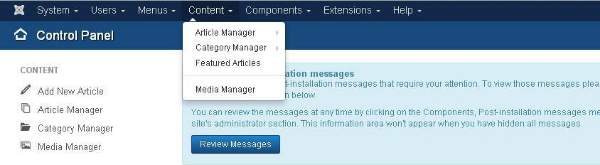
 Here, we have mentioned the details about the column header present on the Article Manager page.
 Here you can search the item in the article manager page by selecting any of these − Select Status, Select category, Select Max Levels, Select Access, Select Author, Select language or Select Tag.

Here you can create your article or web page by specifying the title in Title bar and we can add or write content in the content tab.

Here, we have mentioned the details about the column header present on the Category Manager page.

Here the yellow star mark indicates the article is featured. The star mark is present next to each article for featured articles.
Here, we have mentioned the details about the column header present in theFeatured Article page.


Article Manager
In Article Manager, you can create the standard pages that consist of images, text and hyperlinks. Click on Content → Article Manager menu on Joomla administrative panel,- Checkbox − It is used to select one or more items.
- Status − specifies the status of the page or article, i.e., Publish/Unpublish/Archieve/trashed.
- Title − Specifies the name of the title that will be displayed in the menu.
- Access − Specifies the access level, i.e. public or private.
- Author − This is the author name who has created that particular item.
- Language − Specifies the item language used.
- Date − Specifies the article creation date.
- Hits − Specifies the number of times the item was viewed.
- ID − It is the unique identification number assigned to the items automatically.
Add New Article
Click on Content → Article Manager → Add New Article menu on the Joomla administrative panel, then you will get the following screen. The same page can be viewed when you click on Category Manager → Add New CategoryHere you can create your article or web page by specifying the title in Title bar and we can add or write content in the content tab.
Category Manager
Category Manager is used to create categories for the articles which allows grouping your content better. Click on Content → Category Manager menu on the Joomla administrative panel, then you will get the following screen image −Here, we have mentioned the details about the column header present on the Category Manager page.
- Checkbox − It is used to select one or more category items by clicking on the box.
- Status − Specifies the status of the category i.e. Publish/Unpublish.
- Title − Specifies the name of the title in the category.
- Access − Specifies the access level, i.e. Public or Private.
- Language − Specifies the item language used.
- ID − It is the unique identification number assigned to the items automatically.
Featured Article
Click on Content → Featured Manager menu on the Joomla administrative panel, then you will get the following screen −Here the yellow star mark indicates the article is featured. The star mark is present next to each article for featured articles.
Here, we have mentioned the details about the column header present in theFeatured Article page.
- Checkbox − It is used to select one or more items by clicking on the box.
- Status − Specifies the status of the page or article, i.e. Publish/Unpublish.
- Title − Specifies the name of the title that displays in the menu.
- Ordering − Specifies the order of item creation.
- Access − Specifies the access level, i.e. public or private.
- Author − Describes the author name who has created that particular item.
- Language − Specifies the item language used.
- Date − Specifies the date of the article it was created on.
- ID − It is the unique identification number assigned to the items automatically.
Media Manager
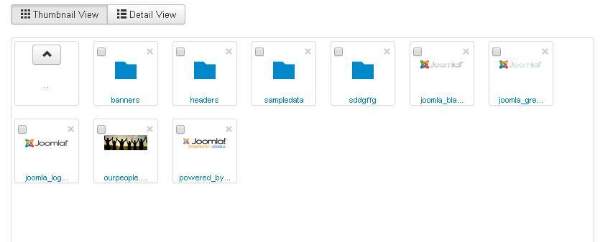
You can manage your media files by uploading a new file or deleting the existing ones using media manager. Click on Content→Media Manager menu on the Joomla administrative panel, then you will get the following screen −Thumbnail View
Thumbnail view contains previews of images and icons of sub-folder. When we click on Thumbnail View then the media manager will look like as shown below.Detail View
Detail view contains the file details. In the detail view, the file information such as dimension and file size are displayed. When we click on the Detail View then the media manager will look like as shown below.
Subscribe to:
Posts (Atom)
-
واٹس ایپ ایک مفت اور مقبول انسٹنٹ میسجنگ ایپلی کیشن ہے جسے آج کل زیادہ تر لوگ استعمال کرتے ہیں۔ یہ پی سی اور موبائل فون دونوں سمیت مختلف ...
-
Paragraph Tag The <p> tag offers a way to structure your text into different paragraphs. Each paragraph of text should go in betwe...
-
 Click on Components Menu, a dropdown menu as shown below will be displayed. Banners Components → Banners are used to setup the banne...